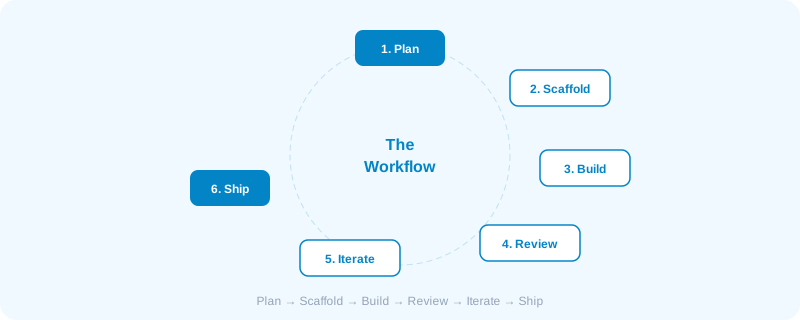
Having the right tools is only half the equation. The other half is knowing how to use them effectively.
Most people fail at vibe coding not because the AI isn't good enough, but because they prompt poorly.
Here's the workflow that actually works.
Phase 1: Plan Before You Prompt
The biggest mistake beginners make: jumping straight into prompting without a plan.
Before you touch any AI tool:
- Define what you're building. One sentence. "A task tracker that lets me organize tasks by project and due date."
- List the core features. Keep it to 3-5 for v1. More features = more confusion for the AI.
- Choose your tech stack. Even if you don't code, pick a stack. The AI works better with constraints. (React + Tailwind + Supabase is a solid default.)
- Sketch the UI. Even rough wireframes on paper help. You can describe them to the AI or use them as reference in tools like Lovable.
Remember
This 15-minute planning phase saves hours of iteration later.
Phase 2: Start Small, Build Up
Never ask the AI to build everything at once.
This prompt will fail: "Build me a full project management app with user auth, real-time collaboration, Gantt charts, file uploads, and Slack integration."
This prompt will succeed: "Create a new React app with Tailwind CSS. Set up the project structure with a main layout, sidebar navigation, and a placeholder dashboard page."
Then:
"Add a task list component to the dashboard. Each task should have a title, status (todo/in-progress/done), and due date."
Then:
"Add the ability to create new tasks with a form that appears when clicking an 'Add Task' button."
The pattern: Each prompt should be 1 focused feature or change. 3-5 prompts per work session. Review after each one.
Phase 3: Prompt with Context
Generic prompts get generic results. The more context you give the AI, the better the output.
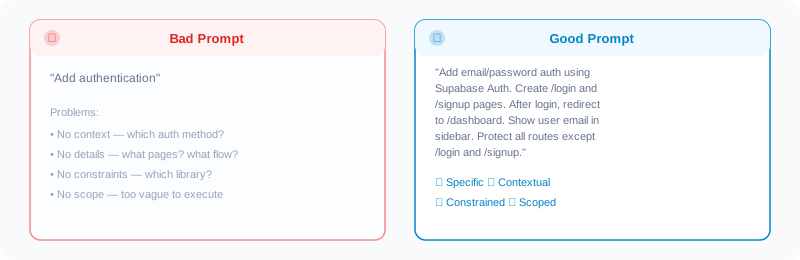
What makes a good prompt:
- Specific — exactly what you want, where, and how
- Contextual — reference existing files, components, or patterns
- Constrained — mention the tech stack, libraries, or approaches to use
- Scoped — one feature or change per prompt
Phase 4: Review Everything
This is where most vibe coders fail. They accept AI output without checking it.
After every generation:
- Read the code. Even if you don't understand every line, scan for obvious issues — missing error handling, hardcoded values, unused imports.
- Test it immediately. Run the app. Click every button. Try edge cases. Enter empty forms. Refresh the page.
- Check the diff. What changed? Did the AI touch files you didn't expect? Did it remove something that was working?
If something looks wrong, don't just prompt "fix it." Describe the specific problem:
"The task form submits successfully but the new task doesn't appear in the list until I refresh the page. It should appear immediately."
Phase 5: Iterate and Refine
Building with AI is an iterative process. Your first prompt rarely produces the final result.
The iteration loop:
- Prompt a feature
- Review the output
- Test it
- Describe what needs to change
- Review the fix
- Repeat until satisfied
Pro tips: If the AI keeps getting something wrong after 3 attempts, try a completely different approach. Save working checkpoints with Git before making big changes. When stuck, ask the AI to explain its approach before asking it to change things.
Phase 6: Ship It
At some point, you need to stop iterating and ship.
Before you deploy:
- Test on mobile — most vibe-coded UIs need mobile fixes
- Check all forms actually submit (or at least handle errors gracefully)
- Verify any API keys or secrets aren't exposed in the code
- Run a build to catch any errors that only appear in production mode
- Set up a domain and deploy (Vercel, Cloudflare Pages, or Netlify all work)
Done is better than perfect. Ship v1, get feedback, then improve. The speed advantage of vibe coding means you can iterate faster than traditional development — use that to your advantage.
Putting It All Together
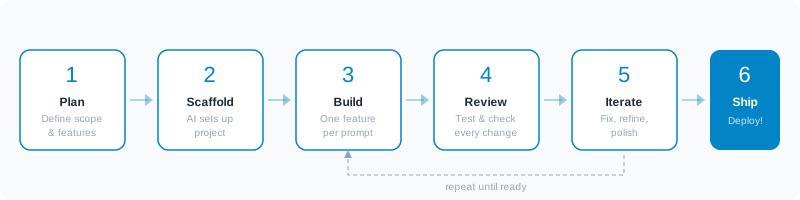
The full workflow
- Plan — Define the project, features, and tech stack (15 min)
- Scaffold — Let AI set up the project structure (1 prompt)
- Build — Add features one at a time (3-5 prompts per feature)
- Review — Read code, test, check diffs (after every prompt)
- Iterate — Fix issues, refine, polish (as needed)
- Ship — Deploy and get feedback (then repeat from step 3)
This workflow works whether you're a developer using Cursor or a non-technical founder using Lovable. The principles are the same — only the tools differ.