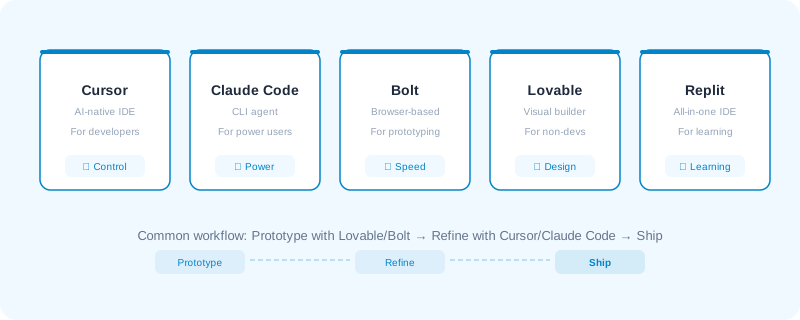
The tools you choose shape your entire vibe coding experience. Pick the wrong one and you'll fight the tool instead of building your project.
Here's an honest breakdown of the major players.
Cursor

Best for: Developers who already code and want to move faster
AI-native code editor built on VS Code. Deep codebase awareness — it reads all your files.
How it works: You chat with AI inside your editor. It understands your entire codebase — not just the file you're looking at. You can ask it to refactor functions, add features, fix bugs, or explain code.
Strengths: Feels like a supercharged VS Code. Great for existing projects. You maintain full control.
Weaknesses: Requires coding knowledge. Not great for starting from scratch. $20/month Pro tier.
When to use it: You're a developer building a real project and want AI assistance without giving up control.
Claude Code

Best for: Advanced users who want the most powerful experience
CLI-based AI coding agent by Anthropic. Handles complex, multi-file changes across any project.
How it works: You describe what you want in your terminal. Claude Code reads your project, makes changes across multiple files, runs commands, and iterates based on errors. It's like having a senior developer who works at 100x speed.
Strengths: Extremely capable. Works with any language. Plan mode lets you review before executing. No vendor lock-in.
Weaknesses: CLI-only — no visual interface. Requires comfort with the terminal. Usage-based pricing.
When to use it: You want the most capable AI coding tool and don't mind working in the terminal.
Bolt

Best for: Rapid prototyping and MVPs
Browser-based full-stack app generator. Zero setup — idea to working full-stack app in your browser.
How it works: Describe your app, and Bolt generates a full-stack application with frontend, backend, and database. You iterate in the browser.
Strengths: Zero setup. Full-stack out of the box with Supabase. Fast from idea to prototype.
Weaknesses: Limited customization. Less control over architecture. Can feel constrained for complex projects.
When to use it: You want to go from idea to working prototype in hours, not days.
Lovable

Best for: Non-technical users and product-first teams
Visual + natural language app builder. Highest quality UI output of any tool.
How it works: Describe what you want or import a design, and Lovable generates a polished application. It blends design tools with code generation.
Strengths: Best-looking output. Great for visual thinkers. Idea to deployed app in minutes. Most accessible for non-developers.
Weaknesses: Less control over code quality. Limiting for complex logic. Somewhat locked into their ecosystem.
When to use it: You're validating an idea and want the best-looking result fastest — especially if you're not a developer.
Replit

Best for: Learning to code and collaborative development
Full development environment with an AI agent. Everything in one place — code, run, deploy.
How it works: Write prompts, edit code, and deploy — all from the same platform. Replit's AI agent can build entire applications from descriptions.
Strengths: All-in-one platform. Great community. Multi-language support. Good free tier.
Weaknesses: AI quality can be inconsistent. Performance limitations on free tier. Less mature for serious development.
When to use it: You're learning, experimenting, or want a quick environment without any setup.
Codex by OpenAI
Best for: Developers already using ChatGPT who want an integrated coding agent
OpenAI's dedicated coding agent. Codex runs in the cloud, can work on your codebase autonomously, and integrates with GitHub for pull requests.
How it works: You give Codex a task — fix a bug, add a feature, write tests — and it spins up a cloud sandbox with your repo, makes the changes, and opens a pull request. It works asynchronously, so you can assign multiple tasks and review the results later.
Strengths: Runs in the background — assign tasks and come back later. Direct GitHub integration with PR creation. Can handle multiple tasks in parallel. Backed by OpenAI's latest models.
Weaknesses: Cloud-only — can't work on local files. Requires a ChatGPT Pro/Team subscription. Less hands-on than tools like Cursor or Claude Code. You review after the fact, not during.
When to use it: You want to delegate coding tasks and review results as pull requests — more like managing a junior developer than pair programming.
Antigravity by Google
Best for: Teams building AI-powered apps on Google's ecosystem
Google's entry into the vibe coding space. Antigravity lets you build full-stack apps using natural language, powered by Gemini. Tightly integrated with Firebase, Cloud Run, and the Google Cloud ecosystem.
How it works: Describe your app idea, and Antigravity generates a working application using Google's infrastructure. It handles frontend, backend, database, and deployment — all within the Google ecosystem.
Strengths: Deep Google Cloud integration. Built-in Firebase for database and auth. Free tier to get started. Good for apps that need Google services (Maps, Auth, Cloud Functions).
Weaknesses: New and still maturing. Locked into Google's ecosystem. Less community content and tutorials compared to established tools.
When to use it: You're already in the Google ecosystem or want tight integration with Firebase and Google Cloud services.
My Setup: VS Code + Claude
What I actually use every day
I don't use Cursor. I don't use the Claude desktop app for coding. My setup is simple: VS Code + Claude Code extension.
Here's why this works better for me than the alternatives:
Why VS Code over the Claude app?
The Claude desktop app is fantastic for writing, research, and conversation. But for coding, you want the AI living inside your editor — not in a separate window where you're copy-pasting code back and forth.
In VS Code with Claude:
- Claude can see my entire project structure
- It can read and edit files directly
- I can review changes as diffs before accepting
- Everything stays in one place — no context switching
My actual workflow:
- Open my project in VS Code
- Use Claude Code to describe what I want to build or change
- Review the suggested changes in the diff view
- Accept, modify, or reject — then test
- Commit with Git when it works
The blog you're reading right now was built entirely with this setup. VS Code + Claude Code. No other AI coding tool. It handles everything from creating components to debugging build errors to writing content.
It's not the flashiest setup. But it's the one I actually ship with every day.
Choosing Your Stack
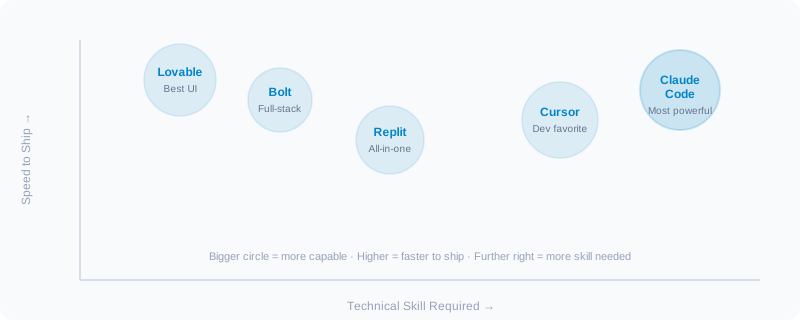
There's no single best tool. Most effective builders use a combination:
The common workflow
- Lovable or Bolt to prototype — get the idea working fast
- Cursor or Claude Code to refine — clean up code, add complexity
- Deploy with confidence
Quick decision matrix:
| Your situation | Best starting point |
|---|---|
| Non-technical, validating an idea | Lovable |
| Developer, want speed boost | Cursor |
| Advanced dev, complex project | Claude Code |
| Quick prototype needed | Bolt |
| Learning to code | Replit |
The tool matters less than your ability to describe what you want clearly. That's the skill that transfers across all of them.