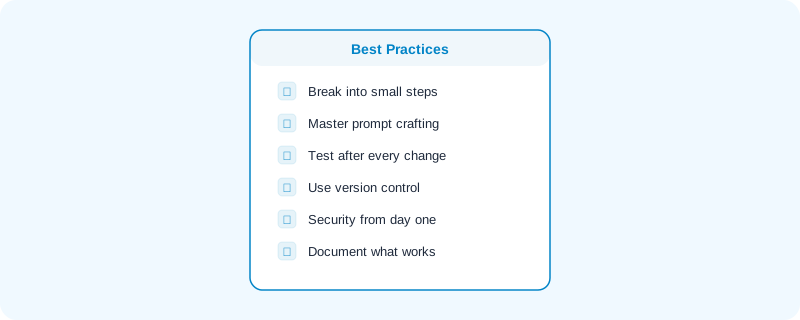
The difference between someone who ships great software with AI and someone who gives up after an afternoon usually comes down to habits, not talent.
Here are the practices that actually matter.
Break Everything Into Small Steps
Rule #1
This is the single most important practice. If you remember nothing else from this guide, remember this: one focused request per prompt.
The anti-pattern: One massive prompt asking for 5 features at once. The AI gets confused, produces brittle code, and you can't tell which part broke.
Don't do this: "Build a dashboard with charts, filters, a data table, export to CSV, and real-time updates."
Do this instead — one step at a time:
- "Create a dashboard page with a header and empty content area."
- "Add a data table showing 10 sample rows with name, date, and status."
- "Add a search filter above the table that filters rows by name."
- "Add a line chart showing status counts over time."
Each step is testable. Each step builds on the last. When something breaks, you know exactly which change caused it.
Master Prompt Crafting
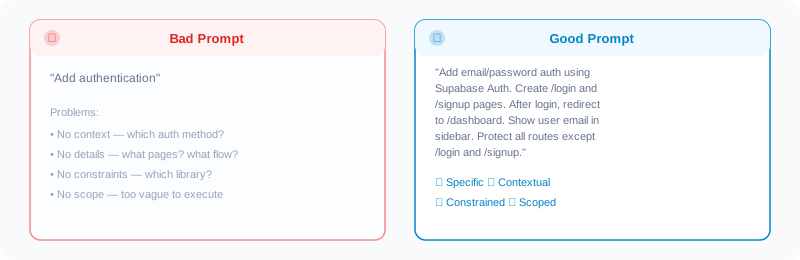
Your prompts are your product specifications. Treat them that way.
Anatomy of a great prompt:
[CONTEXT] I'm building a blog with Astro and Tailwind CSS.
[TASK] Add a contact form to the /contact page.
[DETAILS] The form should have name, email, and message fields.
          All fields are required. Show inline validation errors.
          On submit, show a success message and clear the form.
[CONSTRAINTS] Use only Tailwind for styling. No external form libraries.
              Match the existing site's design language.
Prompt tips:
- Reference existing files: "Following the same pattern as PostCard.astro..."
- Specify error handling: "If the API call fails, show an error message."
- Mention what NOT to do: "Don't add any new dependencies."
Test After Every Change
AI-generated code can look perfect and be completely broken.
After every prompt:
- Run the app
- Test the happy path (does it work as expected?)
- Test edge cases (empty inputs, long text, rapid clicks)
- Check the browser console for errors
- Try it on mobile
Testing checklist
- Forms: empty submit, very long inputs, special characters
- Lists: empty state, one item, many items
- Navigation: back button, direct URL access, refresh
- Auth: logged out state, expired session
- Mobile: tap targets, overflow, keyboard behavior
Use Version Control Religiously
Git isn't optional when vibe coding. It's your safety net.
The practice:
- Commit after every working feature
- Write clear commit messages: "Add task creation form" not "update"
- Create branches for experimental features
- Never let AI override your Git history
When things go wrong (and they will):
git stash        # Save current broken state
git checkout .   # Revert to last working state
This takes 5 seconds and saves hours of debugging.
Integrate Security From Day One
That's not a scare statistic — it's from multiple independent studies.
Common security issues in AI code:
- No input validation (SQL injection, XSS)
- Hardcoded API keys or secrets
- Missing authentication checks
- Overly permissive CORS settings
What to do:
- Include security requirements in your prompts: "Validate all user inputs. Sanitize HTML."
- Never commit
.envfiles or API keys to Git - Use established auth libraries (don't let AI roll its own auth)
- Before deploying, explicitly ask the AI: "Review this code for security vulnerabilities."
Document What Works
Vibe coding is iterative. The prompts that work well today will work well tomorrow.
Keep a prompt library
Save prompts that produced great results. Note the tool, model, and context. Over time, this library becomes your most valuable asset.
Example entry:
Tool: Claude Code
Context: Astro blog with Tailwind
Prompt: "Add a category filter to the blog listing page.
         Display as horizontal pills."
Result: Worked perfectly on first try.
Know When to Stop Prompting
Sometimes the AI gets stuck. After 3 failed attempts at the same thing, consider:
- Simplify the request — maybe you're asking for too much at once
- Try a different approach — describe the problem, not the solution
- Write it yourself — for small fixes, manual editing is faster
- Switch tools — what Claude Code can't do, Cursor might
Vibe coding isn't "never write code." It's "write code only when you need to." Sometimes you need to.